
How to Start Making Electronic Music: A Beginner's Guide
The hardest part of starting electronic music isn't the ideas. It's working out where to put them. There's so much software, hardware and advice out there that a lot of people spend months choosing tools and never finish a track.
So here's a short, practical route in: what you actually need, what you can get free, and what to learn first.
1. Pick a genre to start with

Electronic music covers a huge range, and each style is made differently. Blending genres is where a lot of interesting music comes from, but when you're learning, focusing on one style speeds things up, because you're learning one set of fundamentals rather than five.
Some examples of how different they are. Chillwave leans on pitched-down samples, fuzzy, noisy synths and a low BPM. Synthwave is quicker, with cleaner synth sounds and an unmistakable 80s signature. Club styles such as house and techno are built on repetition, with the emphasis on the groove: chords, stabs and sometimes vocals in house, and a driving or funky bassline underneath. Trance is about long builds, big melodic leads and the breakdown.
Every style has its own sonic signature, and production approaches vary wildly. Pick one, learn how it's put together, then broaden out once you've got the fundamentals.
2. Get a DAW

Any reasonably modern PC, Mac or laptop is enough to start. The software you'll make music in is a DAW (digital audio workstation), and it's where you record, arrange and mix everything.
The popular choices for electronic music are Ableton Live, FL Studio, Logic Pro, Cubase, Bitwig Studio and Fender Studio Pro (which was PreSonus Studio One until January 2026). Nearly all of them have a free trial or a cheap entry-level edition, so try a couple before you commit. Entry versions are also often bundled with MIDI keyboards and audio interfaces from brands such as Akai and Novation, which is worth keeping an eye out for.
If your budget is zero, there are good options:
- Cakewalk Sonar (Windows): BandLab retired the old free Cakewalk by BandLab in 2025 and replaced it with Cakewalk Sonar, which has a free tier. It needs a free BandLab account, and a few premium features are kept for paying members.
- GarageBand (Mac): free, and its projects open in Logic Pro if you upgrade later.
- Reaper (Windows, Mac, Linux): not free, but it has a generous trial and a cheap licence for personal use.
Not sure which suits you? Read which DAW is best for electronic music production and the DAWs dance producers use.
3. Headphones or monitors
Apart from a computer and DAW, the next thing that matters is being able to hear what you're doing. A decent pair of studio headphones or monitors gives you a more honest picture than consumer speakers, which tend to flatter the bass. If you're in a small or untreated room, good headphones are often the better first buy.
Michael Wynn's guide to budget headphones is a good place to start:
4. Learn a little music theory
You don't need a music degree, but knowing scales, keys and how chords fit together makes everything quicker. Learn what a minor key is, how to build a basic triad, and a few common progressions, and you'll stop guessing which notes work.
A shortcut while you learn: our free MIDI chord pack has thousands of chords and progressions in every major and minor key. Drag one into your DAW, put it on a synth and you've got a starting point.
5. Get some sounds, then learn to make your own

Your DAW comes with instruments and effects, and they're better than people give them credit for. When you want more, there are excellent free synths: see our guide to the best free synth plugins. For drums and loops, grab our free sounds.
Presets get you moving, but learning to make your own sounds is where your music starts to sound like you. Start with our synthesizer definitions guide to understand oscillators, filters and envelopes, then try the five essential sound design tips, and move on to the advanced sound design tips when you're ready.
6. Write, then arrange
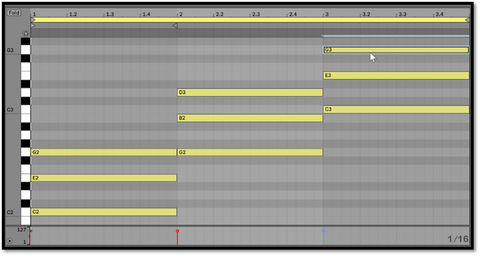
Start small: a drum loop, a bassline and one chord progression. Get an eight-bar loop that sounds good, then turn it into a track by adding and removing parts over time. Most beginners get stuck with a great loop and no song, and the way out is arrangement.
A good trick is to drag a track you like into your DAW and mark where each section starts: intro, build, drop, breakdown. Copy the structure, not the sounds. Use automation (filter sweeps, volume rides) to add movement.
7. Learn the basics of mixing

Mixing is balancing the parts so everything can be heard. Start with volume and panning, which do more than any plugin. Then learn EQ (cutting what each sound doesn't need, so they don't fight), compression (controlling dynamics) and reverb and delay (creating space).
Mastering is the final polish and loudness on the finished mix. Don't worry about it early on. A good mix through a simple limiter will beat a bad mix with an expensive mastering chain every time. When you're ready for better tools, our list of the 10 essential plugins covers what's worth buying.
8. Listen, learn and share

Listen widely and listen like a producer: what's the kick doing, when does the bass come in, what drops out before the drop? Go to gigs and club nights if you can. You learn a lot about arrangement from watching a room react.
Online, Gearspace and r/musicproduction are useful, and every DAW has its own forum or community where you'll find answers to almost any question. Share your tracks and ask for honest feedback. It stings at first, but it's the quickest way to get better.
The short version
Pick one genre. Get a DAW, free or otherwise, and decent headphones. Learn a little theory, use the free tools, and finish tracks, even bad ones. Finishing teaches you more than starting a hundred loops. Everything else can wait.